
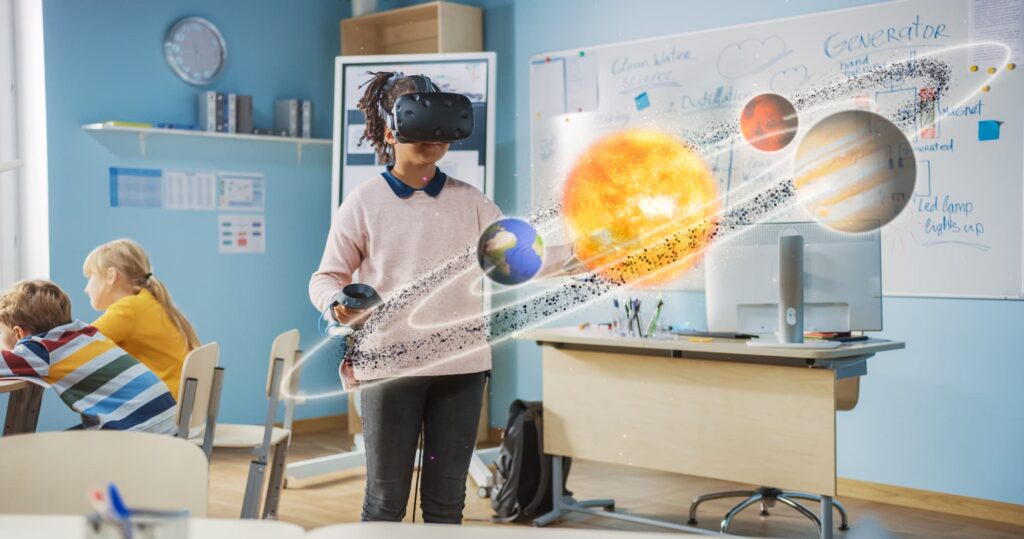
Education is evolving as technology creates new ways for students to explore information, practice skills, and understand complex ideas. One of the most promising developments is virtual reality, which allows learners to enter computer-generated environments and interact with digital objects as if they were present in a different place.
The use of virtual reality in education can transform lessons from passive learning experiences into interactive activities. Instead of only reading about historical locations, scientific processes, or distant planets, students may explore virtual environments that help them visualize these subjects more clearly.
Virtual reality can support science experiments, historical exploration, medical training, language learning, and career preparation. However, its educational value depends on thoughtful lesson design, suitable technology, and clear learning objectives.
This article explains how virtual reality works in education, its major benefits, practical classroom applications, common challenges, and strategies teachers can use to introduce immersive learning effectively.
What Is Virtual Reality in Education?
Virtual reality in education refers to the use of computer-generated environments to support teaching, learning, training, and educational exploration.
Students may experience these environments through VR headsets, computers, or compatible mobile devices. Depending on the technology, learners can look around a simulated environment, interact with digital objects, and complete guided activities.
For example, a biology student might explore a three-dimensional model of a human heart. A geography class could visit a simulated volcanic landscape, while history students might investigate a digital reconstruction of an ancient city.
Virtual reality differs from traditional digital learning because it can create a stronger sense of presence within a simulated environment. This experience can be especially valuable when students need to understand spatial relationships, observe processes, or practice procedures.
Not every VR experience requires an expensive headset. Some educational activities use 360-degree videos or less immersive simulations that can be viewed on ordinary screens.
7 Ways Virtual Reality Creates New Learning Opportunities
1. Makes Complex Concepts Easier to Visualize
Some educational concepts are difficult to understand through written explanations alone. Topics involving microscopic structures, distant objects, three-dimensional systems, or complex processes may be easier to explore visually.
Virtual reality allows teachers to present these concepts in interactive environments.
For example, students studying astronomy could explore a simulated solar system to understand the relative positions of planets. Biology students could examine the structure of a cell, while engineering students could inspect a virtual machine from different angles.
These experiences can help learners build mental models of difficult subjects. Teachers should still provide explanations and activities that connect the virtual experience to the underlying academic concepts.
2. Encourages Active Student Participation
Traditional lessons often require students to listen, read, or observe information. VR can give learners opportunities to interact with their learning environment.
Students might manipulate virtual objects, investigate a simulated location, complete a task, or make decisions that influence what happens next.
For example, a physics teacher could introduce a simulation in which students change variables and observe how those changes affect a system.
Active participation encourages learners to explore questions rather than simply memorize information. Teachers can strengthen this process by asking students to explain their observations and describe what they learned.
3. Provides Safe Opportunities for Practical Training
Some skills are difficult, expensive, or potentially dangerous to practice in real-world settings. Virtual reality can provide a controlled environment where learners can rehearse procedures before applying them outside the simulation.
Medical students may practice selected clinical procedures, engineering students can examine industrial systems, and vocational learners may rehearse equipment-handling tasks.
A virtual simulation can allow students to repeat an activity, review mistakes, and try different approaches without using physical materials each time.
However, simulated practice does not automatically replace supervised real-world training. Students still need appropriate instruction, assessment, and practical experience when their field requires it.
4. Brings History and Geography to Life
Virtual reality can help students explore places and environments that may be difficult to visit in person.
History teachers can use virtual reconstructions to illustrate the layout of ancient settlements, historical buildings, or important cultural sites. Geography students can explore landscapes, coastlines, deserts, and mountain regions.
These experiences may help students understand the relationship between places, people, and historical events.
For example, learners studying ancient civilizations could explore a reconstructed city and identify how its buildings, roads, and public spaces were organized.
Teachers should explain that virtual reconstructions are interpretations based on available evidence. Students should distinguish historically supported details from features added to complete a simulation.
5. Supports Science, Technology, Engineering, and Mathematics Learning
Science, technology, engineering, and mathematics subjects often involve abstract concepts and processes that benefit from visualization and practical exploration.
VR can support learning activities involving geometry, physics, anatomy, engineering design, and scientific systems.
Students might explore geometric shapes in three dimensions, inspect a virtual engineering model, or observe how components interact within a simulated machine.
These activities can help connect theoretical knowledge with practical understanding.
The greatest value comes when students have a clear task to complete. For example, rather than simply exploring a virtual laboratory, students could predict the outcome of an experiment, record observations, and explain whether the results support their predictions.
6. Creates Opportunities for Language and Communication Practice
Learning a language involves more than memorizing vocabulary and grammar rules. Students also need opportunities to practice communication in realistic contexts.
Virtual reality can simulate everyday situations such as visiting a restaurant, navigating an airport, shopping, or participating in a workplace conversation.
Students can practice vocabulary, listen to spoken language, and rehearse responses in a contextual environment.
For example, a language teacher could assign a simulated travel scenario in which learners ask for directions and respond to common questions.
VR may also help students prepare for presentations, interviews, and other communication tasks. Teachers should ensure that activities include feedback and opportunities to practice language outside the virtual environment.
7. Supports Career Exploration and Professional Development
Virtual reality can introduce students to different workplaces and professional tasks before they enter a career.
Students may explore simulated environments related to healthcare, architecture, manufacturing, emergency response, or technical training.
These experiences can help learners understand workplace processes and identify skills that different occupations require.
For example, students considering engineering careers could inspect a virtual construction site and learn how various professionals contribute to a project.
Career simulations should complement other forms of career education, including discussions with professionals, practical projects, and real-world workplace experiences where available.
Benefits of Virtual Reality in Education
When carefully designed and appropriately implemented, VR-based learning can offer several educational benefits.
Improved Visualization
Virtual environments can help students examine structures, systems, and spatial relationships that are difficult to represent through flat images or text alone.
Experiential Learning
Students can investigate simulated situations, complete tasks, and connect classroom concepts with practical experiences.
Opportunities for Repeated Practice
Learners may repeat selected procedures and activities, allowing them to improve their performance through practice and feedback.
Increased Engagement
Interactive environments can encourage curiosity and active participation when the experience is relevant to the lesson.
Contextual Understanding
Simulated visits and workplace scenarios can help students connect information with places, situations, and practical applications.
Flexible Learning Experiences
Virtual simulations may provide learning opportunities that would otherwise require travel, specialized equipment, or access to difficult-to-reach environments.
These benefits depend on the quality of the learning activity. Research on immersive virtual reality suggests potential learning advantages in some contexts, particularly when students actively manipulate or construct information. However, results vary according to the subject, instructional design, comparison method, and assessment used.
How Teachers Can Use Virtual Reality in Different Subjects
Virtual reality is not limited to science or technology classrooms. Teachers can adapt immersive activities to several academic subjects.
| Subject | Example VR Activity | Learning Objective |
|---|---|---|
| Science | Explore a virtual ecosystem | Understand relationships between organisms |
| Biology | Examine a three-dimensional organ model | Identify structures and their functions |
| History | Visit a reconstructed historical site | Interpret historical environments |
| Geography | Explore different landscapes | Understand physical features and environments |
| Mathematics | Manipulate three-dimensional shapes | Develop spatial reasoning |
| Language learning | Practice simulated conversations | Improve vocabulary and communication |
| Engineering | Inspect a virtual machine | Understand components and design |
| Career education | Explore a simulated workplace | Identify professional tasks and skills |
Teachers should select activities based on the specific learning outcomes they want students to achieve rather than using VR simply because it is an exciting technology.
Challenges of Using Virtual Reality in Education
Despite its potential, virtual reality presents practical and instructional challenges that schools need to consider.
1. Equipment and Implementation Costs
VR headsets, compatible computers, software licenses, charging equipment, and maintenance can create additional costs.
Schools may also need to invest in staff training and technical support.
A practical starting point is to introduce a small pilot program and evaluate its educational value before purchasing equipment for an entire institution.
2. Physical Discomfort
Some users experience dizziness, nausea, eye strain, fatigue, or motion discomfort during VR activities.
Teachers should follow the equipment manufacturer’s safety guidance, keep sessions appropriate for the learners, provide breaks, and allow students to stop whenever they feel uncomfortable.
Alternative learning activities should be available for students who cannot comfortably use VR equipment.
3. Unequal Access
Not all schools have the same budgets, devices, technical infrastructure, or internet connectivity.
If access to VR is limited, teachers can organize small-group rotations, use compatible non-headset simulations, or provide equivalent activities using conventional classroom materials.
Educational opportunities should not depend entirely on a student’s ability to access expensive equipment.
4. Technical Difficulties
Software compatibility issues, device setup, connectivity problems, and equipment failures can interrupt lessons.
Teachers should test activities in advance and prepare a backup plan so that students can continue learning if the technology stops working.
5. Teacher Training
Teachers need time to become familiar with VR equipment, choose suitable learning applications, manage classroom activities, and connect virtual experiences with curriculum requirements.
Professional development can help educators create structured lessons instead of relying on technology alone to engage students.
6. Distraction and Cognitive Overload
An immersive environment may contain many visual details and interactive elements. Students can become distracted by exploring the environment rather than focusing on the intended learning objective.
Teachers should provide clear instructions, short tasks, guiding questions, and structured reflection activities.
7. Privacy and Student Safety
Some VR applications may collect information about accounts, usage, movements, or interactions.
Schools should evaluate privacy practices, age suitability, content moderation, and data security before adopting an application. Teachers should also establish rules for appropriate behavior in shared virtual environments.
How to Integrate Virtual Reality Into Classroom Teaching
Successful VR integration requires more than providing students with headsets. Teachers should design the experience around a specific learning goal.
Step 1: Define the Learning Objective
Decide what students should understand or be able to do after the activity.
For example, a biology lesson might aim to help students identify the main structures of the human heart and explain their functions.
Step 2: Select an Appropriate Experience
Choose a simulation that directly supports the objective and matches students’ ages, abilities, and prior knowledge.
The most visually impressive experience is not necessarily the most educationally useful.
Step 3: Prepare Students Before the Activity
Introduce key vocabulary, explain the task, and discuss any relevant background information.
Preparation helps students focus on the learning objective instead of spending the entire session trying to understand the environment.
Step 4: Provide a Guided Task
Give students specific questions to answer, objects to identify, or procedures to practice.
For example, learners could record three observations during a virtual ecosystem exploration and explain how two organisms depend on each other.
Step 5: Encourage Reflection Afterward
Ask students to summarize what they learned, explain their observations, or compare the virtual experience with classroom materials.
Reflection helps connect the immersive activity with broader subject knowledge.
Step 6: Assess Learning Outcomes
Use a short quiz, written explanation, discussion, project, or practical task to evaluate understanding.
Teachers should assess what students learned rather than how much they enjoyed the technology.
Step 7: Review and Improve
Gather feedback from students and consider whether the activity improved understanding, supported participation, and justified the time and resources required.
Use this information to refine future lessons.
Is Virtual Reality Better Than Traditional Teaching?
Virtual reality is not automatically better than textbooks, demonstrations, discussions, or hands-on classroom activities.
Each method has different strengths. Textbooks can provide detailed explanations, classroom discussions encourage communication, and physical experiments allow students to work with real materials.
VR is particularly useful when immersion, spatial visualization, or repeated practice offers a clear advantage.
For example, a virtual tour may help students explore a distant location, while a traditional map may be better for comparing geographic boundaries. A simulation can provide repeated procedural practice, but some practical skills still require real equipment and direct supervision.
The most effective approach is to combine teaching methods according to the subject, student needs, available resources, and learning objectives.
The Future of Virtual Reality in Education
As immersive technologies develop, virtual reality may provide more opportunities for interactive lessons, professional training, remote collaboration, and accessible educational experiences.
Advances in simulation design may allow students to explore increasingly detailed environments and practice more complex tasks. Virtual environments may also be combined with artificial intelligence to provide guided activities or responsive feedback.
However, schools will need to consider affordability, accessibility, teacher preparation, privacy, and evidence of learning effectiveness.
The future of VR in education will depend not only on technical improvements but also on how well educators design meaningful learning experiences around the technology.
Frequently Asked Questions
What is virtual reality in education?
Virtual reality in education uses computer-generated environments to support learning, practice, exploration, and training. Students may interact with simulated places, objects, and situations to better understand academic concepts.
How does virtual reality improve learning?
VR can support visualization, active exploration, contextual understanding, and repeated practice. Its effectiveness depends on the learning objective, the quality of the simulation, and how teachers connect the experience to the curriculum.
What subjects can benefit from virtual reality?
Science, biology, history, geography, mathematics, language learning, engineering, healthcare education, and career training can all benefit from selected VR activities.
Does virtual reality require an expensive headset?
Not always. Some immersive experiences require dedicated headsets, while other educational simulations and 360-degree videos can be viewed on compatible computers or mobile devices. The available experience depends on the software and equipment.
What are the disadvantages of virtual reality in education?
Common challenges include equipment costs, physical discomfort, technical problems, unequal access, teacher training requirements, privacy concerns, and the possibility of distraction.
Is virtual reality suitable for young students?
It may be suitable for selected activities when the content, equipment, duration, and supervision are appropriate for the students’ age and needs. Teachers should follow manufacturer guidance and school policies and provide alternatives when necessary.
Can virtual reality replace teachers?
No. VR can support instruction and practice, but teachers remain essential for explaining concepts, guiding discussion, assessing understanding, supporting individual needs, and helping students reflect on their experiences.
Conclusion
Virtual reality creates new learning opportunities by allowing students to explore simulated environments, visualize complex concepts, practice selected skills, and investigate situations that may be difficult to experience in a traditional classroom.
Its applications range from science experiments and historical exploration to language practice, engineering simulations, and career education.
However, successful implementation requires clear learning objectives, appropriate equipment, teacher preparation, attention to accessibility, and careful evaluation of student outcomes.
By combining virtual experiences with explanation, discussion, practical activities, and assessment, educators can use VR as a meaningful part of modern teaching.
The goal is not simply to make lessons more technologically advanced. It is to help students understand difficult ideas, develop useful skills, and connect what they learn in the classroom with the world around them.
